2022. 3. 10. 19:52ㆍUnityMLAgent/수업 내용
이 포스팅에서는 유니티 ml-agent의 가이드를 참고하여
ML-Agents 를 이해하기 위해 몇 가지 기초 지식을 알아보겠다.
Agent 클래스의 핵심 메서드
https://docs.unity3d.com/Packages/com.unity.ml-agents@1.0/api/Unity.MLAgents.Agent.html
Class Agent | ML Agents | 1.0.8
Class Agent An agent is an actor that can observe its environment, decide on the best course of action using those observations, and execute those actions within the environment. Inheritance Agent Assembly : solution.dll Syntax public class Agent : MonoBeh
docs.unity3d.com
Agent 클래스는 ML-Agent를 사용하기 위해 상속받아야 되는 클래스이다.
Agent 클래스는 에이전트를 위한 다양한 메소드와 속성을 제공하고 있으며, 오버라이드로 사용할 수 있다.
그 중 주축이 되는 핵심 오버라이드 함수의 역할을 알아 보자.
- Initialize()
이 함수는 에이전트 인스턴스를 일회성 초기화시키고, 설정하는 함수이다.
에이전트가 처음 활성화되었을 때, 한 번만 호출된다.
무언가 참조가 필요한 경우, 이 함수 안에 참조 구문을 넣어도 된다.
- OnEpisodeBegin()
이 함수는 에피소드 시작 시 에이전트 인스턴스를 설정한다.
처음 딱 한번 호출되는 Initialize()와 달리,
에이전트가 매 에피소드를 시작 할 때마다 호출된다.
각 에피소드마다 리셋이 필요한 설정이 있을 때 사용한다.
- EndEpisode()
이 함수는 에피소드의 끝을 알리고, OnEpisodeBegin()으로 실행을 넘긴다.
- CollectObservations(VectorSensor)
이 함수는 에이전트의 벡터 관측치를 수집한다.
이 관측치는 에이전트 관점에서 현재 환경을 나타낸다.
또한 에이전트가 목표를 달성하기 위해 도움이 되는 환경 정보이다.
예로, 롤러볼 예제에서는 골 지점과의 거리와 본체의 속도 정보같이
도움이 되는 정보들을 포함할 수 있다.
이 정보들을 관측하는 벡터 관측기에 관찰대상을 추가하는 방법은
VertorSensor.AddObservation(T)를 하면 된다.
- AddObservation(Int32)
- AddObservation(Single)
- AddObservation(Vector3)
- AddObservation(Vector2)
- AddObservation(Quaternion)
- AddObservation(Boolean)
- AddObservation(IEnumerable<Single>)
- AddOneHotObservation(Int32, Int32)
관찰 대상의 갯수는 에디터에서 설정한 Space Size의 수와 같아야 한다.
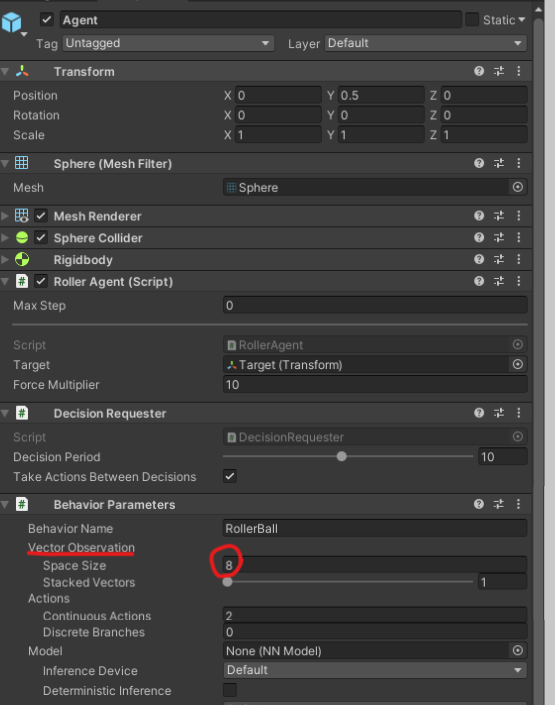
- OnActionReceived(Single[])
이 함수는 인수로 제공된 action을 기반으로 모든 단계에서 에이전트의 동작을 지정해준다.
인수로 action 벡터를 담고 있는 배열을 받는데, 배열의 길이는 에이전트 오브젝트에 부착된
Behavior Parameters 스크립트의 Actions필드와 동일해야 한다.
이 배열의 값을 사용하여 현재 단계에 대한 에이전트의 동작을 지시해야 한다.
만약 action이 0, 0.001, 0.002 ~ 0.999, 1 같이 연속적인 값일 경우에는 Continuous Actions,
이산적인 값이라면 Discrete Actions Branches 와 개수가 동일해야 한다.
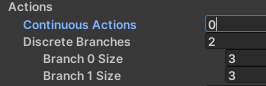
이산값을 사용한다면 그 밑의 Brance Size도 설정해주어야 한다.
한 개의 값의 범위가 -1, 0, 1 이라면 3을 설정해주면 된다.
이벤트 함수의 실행 순서는
Awake -> Initialize -> Start -> OnEpisodeBegin -> CollectObservation -> Heuristic -> OnActionReceived
순으로 이벤트가 실행된다.
[INFO] RollerBall. Step: 10000. Time Elapsed: 86.545 s. Mean Reward: 0.425. Std of Reward: 0.494. Training.
위 구문에서 각 요소가 나타내는 의미.
- Step: The number of timesteps that have elapsed
- Time Elapsed: How much time the training has been running (in real-world time)
- Mean Reward: The average reward (since the last update)
- Std of Reward: The standard deviation of the reward (since the last update)
RollerBall 예제 실습
원글 : https://github.com/Unity-Technologies/ml-agents/blob/main/docs/Learning-Environment-Create-New.md
GitHub - Unity-Technologies/ml-agents: Unity Machine Learning Agents Toolkit
Unity Machine Learning Agents Toolkit. Contribute to Unity-Technologies/ml-agents development by creating an account on GitHub.
github.com
기타 미해결 & 알아 볼 것
decision requester 스크립트는 어떤 역할인지.
하이퍼 파라미터 요소들의 의미
https://github.com/Unity-Technologies/ml-agents/blob/main/docs/Training-Configuration-File.md
GitHub - Unity-Technologies/ml-agents: Unity Machine Learning Agents Toolkit
Unity Machine Learning Agents Toolkit. Contribute to Unity-Technologies/ml-agents development by creating an account on GitHub.
github.com
'UnityMLAgent > 수업 내용' 카테고리의 다른 글
| ML-Agent Penguin 예제로 얻은 훈련 팁 (0) | 2022.03.16 |
|---|---|
| 22.03.11 ML-Agent 롤러볼 예제 실습하기 (0) | 2022.03.14 |